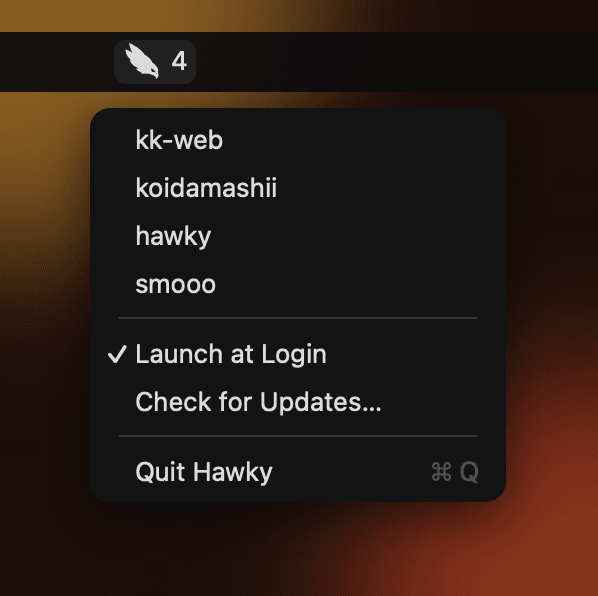
Run Claude Code in a few repositories at once and one of them will stop to ask for permission — silently, in a window you are not looking at. Hawky keeps watch from the menu bar and takes you straight to it.
macOS 14 or later, Apple silicon

Claude Code wants to run a command or edit a file, and waits for your yes.
A number appears next to the hawk in the menu bar. Nothing pops up, nothing steals focus.
Pick the session from the menu and its Cursor window comes to the front, ready for your answer.
Two windows on the same repository are told apart by the title Claude Code gave each session. You land on the one that is actually waiting.
Merged your Cursor windows into tabs? A background tab is invisible to the window list, so Hawky finds it in the tab bar and presses it for you.
Approve, deny or type a new prompt and the entry goes away on its own. A wait stays as long as it lasts, and anything left behind goes away with its Claude Code process, so the count never gets stuck.
No Dock icon, no window, no account. It watches one folder on your Mac and checks for an update once at launch.
Download the DMG and drag Hawky into Applications, or use Homebrew.
brew install --cask piro0919/tap/hawkyThe author is not a registered Apple developer, so the first launch is blocked. Open System Settings → Privacy & Security and click Open Anyway.
Run this once in Terminal. It adds Hawky's hooks to ~/.claude/settings.json and leaves yours alone. Node.js is required.
node /Applications/Hawky.app/Contents/Resources/hook/install.mjsWhen Hawky asks for Accessibility access, allow it — that is how it brings windows to the front.